Imports
Autodesk.AutoCAD.Runtime
Imports
Autodesk.AutoCAD.DatabaseServices
Imports
Autodesk.AutoCAD.Geometry
Namespace HorizontalAttributes
Public Class Commands
Private Shared
myOverrule As KeepStraightOverrule
<CommandMethod("KeepStraight")>
Public Shared Sub ImplementOverrule()
If myOverrule Is Nothing Then
myOverrule = New KeepStraightOverrule
Overrule.AddOverrule(RXClass.GetClass(GetType(AttributeReference)), myOverrule, False)
End If
Overrule.Overruling = True
End Sub
End Class
Public Class KeepStraightOverrule
Inherits TransformOverrule
Public Overrides Sub
TransformBy(ByVal entity As Entity, ByVal transform As Matrix3d)
MyBase.TransformBy(entity, transform)
Dim attRef As
AttributeReference = entity
attRef.Rotation = 0.0
End Sub
End Class
End Namespace
dijous, 24 de novembre del 2022
my_first_autocad_plugin (https://knowledge.autodesk.com/support/autocad/learn-explore/caas/simplecontent/content/lesson-2-getting-to-know-your-development-environment.html)

dimecres, 16 de novembre del 2022
dilluns, 7 de novembre del 2022
EXCEL com detectar el color de fons d'una cel·la
https://www.exceldemy.com/excel-get-cell-color/
The GET.CELL Function: an Overview
We are using GET.CELL to return more information about the worksheet setting than is achievable with the CELL function. We don’t need any VBA code here to implement this.
The Basic Syntax:
type_num is a number that specifies what type of cell information you want.
The following list shows the possible values of type_num and the corresponding results.
One problem is that you cannot use the GET.CELL directly in the worksheet.
The steps are as stated below:
1. Go to Formulas >Name Manager. A Name Manager dialog box will appear.
2. Then, click on New.
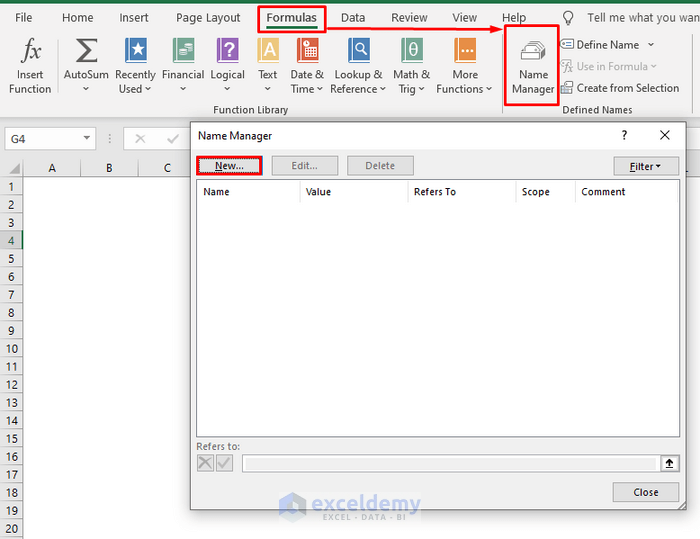
3. Give it any name.
4. In the Refers to box, type the following format:
As we are working with background colors, we are using 63 in the type_num argument.
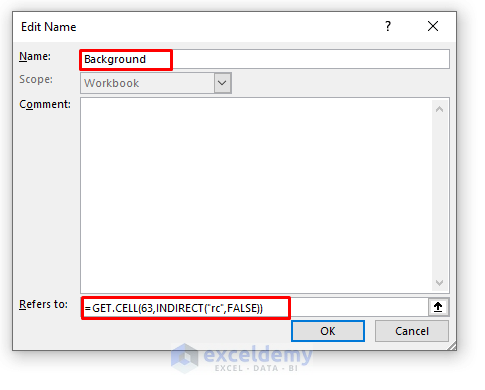
5. Finally, click Ok.
Now, you can use the GET.CELL with the name that you have given.
dimarts, 1 de novembre del 2022
dijous, 27 d’octubre del 2022
Detecció de duplicats en llistes - FuzzyWuzzy (Python)
from fuzzywuzzy import fuzz
with open('C:/Users/JF/Desktop/llistaNoms.txt','r',encoding='utf-8') as f:
my_list = list(f)
for i in range(len(my_list)-1):
for j in range(i+1,len(my_list)):
Str1=(my_list[i])
Str2=(my_list[j])
Ratio = fuzz.ratio(Str1.lower(),Str2.lower())
Partial_Ratio = fuzz.partial_ratio(Str1.lower(),Str2.lower())
Token_Sort_Ratio = fuzz.token_sort_ratio(Str1,Str2)
Token_Set_Ratio = fuzz.token_set_ratio(Str1,Str2)
if (Ratio>80)|(Partial_Ratio>80)|(Token_Sort_Ratio>80)|(Token_Set_Ratio>80):
print(i+1,j+1, Ratio, Partial_Ratio,Token_Sort_Ratio,Token_Set_Ratio)
divendres, 21 d’octubre del 2022
Combinació de valors de dues columnes ABCD... i abcd... resultant Aa Ab Ac Ad... Ba Bb Bc Bd... (Excel VBA) Alt+F11
Sub Macro1()
Dim CantFilaCol1 As Long
Dim CantFilaCol2 As Long
Dim m As Single
CantFilaCol1 = Cells(Rows.Count, 1).End(xlUp).Row
CantFilaCol2 = Cells(Rows.Count, 2).End(xlUp).Row
m = CantFilaCol1 + 2
For fCol1 = 1 To CantFilaCol1 Step 1
For fCol2 = 1 To CantFilaCol2 Step 1
Cells(m, 1).Value = Cells(fCol1, 1).Value & " " & Cells(fCol2, 2).Value
m = m + 1
Next fCol2
Next fCol1
End Sub

dijous, 6 d’octubre del 2022
Afegir text en un vídeo - OBS + OpenShot Video + Processing
Amb l'OBS hem gravat un vídeo-tutorial.
Volem anotar textos al vídeo. Són frases curtes que volem sobreescriure al vídeo.
Utilitzem el programa OpenShot Video. Allà podem descarregar els textos en format SVG.
Per tal d'agilitzar la creació dels textos, automatitzem el procés amb Processing. El programa desa els frames.
El fitxer list.txt conté el text que volem que aparegui. És una matriu amb frases. El processing crearà tantes imatges SVG com linies que contingui el fitxer list.txt .
import processing.svg.*;
int i,iLast,llargada;
void setup() {
size(400, 400);
}
void draw() {
beginRecord(SVG, "C:/.../frame-####.svg");
String[] lines = loadStrings("C:/.../list.txt");
int llargada=lines.length;
textSize(60); fill(0, 408, 612);
text(lines[iLast], 40, 150, 280, 320);
if (iLast+1==llargada){
endRecord();
exit();
}
iLast++;
}